
For many Hong Kong businesses, an office launch is usually measured by visible progress. The office renovation is complete. Desks are installed. Meeting rooms are ready. The company name is on the door.
Yet the real test often comes on the first working day, when staff log in, join video calls, connect to WiFi, print documents, access shared files, and expect every system to work without delay. This is where IT infrastructure quietly becomes operational infrastructure.
Hong Kong’s business environment makes this especially important. Small and medium enterprises account for more than 98% of enterprises in the city and employ around 45% of the private sector workforce, according to the Commerce and Economic Development Bureau. Many of these companies operate with lean teams and limited internal IT resources, which means office IT setup is often compressed into the final stage of a move or expansion.
A proper office IT infrastructure checklist is therefore not just a technical document. It is a pre-go-live control process. Its purpose is to make sure the office is ready to operate as a connected system, not a collection of devices.
What “Go Live” Really Means for Office IT
In office IT, “go live” should mean more than having internet access.
A business is only ready to operate when its network, devices, cloud systems, communication tools, cybersecurity settings, user access, backup process, and support arrangements can work together under real conditions.
This distinction matters because many office IT problems do not appear during installation. They appear when the office begins to behave like an office. Staff move between meeting rooms. Teams join video calls at the same time. Files are uploaded to the cloud. Printers receive multiple jobs. New users ask for access. A guest needs WiFi. Someone clicks a suspicious email.
In that sense, go-live readiness is an operational state. The question is not simply whether the system has been installed. The more useful question is whether the business can start work without unnecessary interruption.
1. Network and Internet Readiness
The first area to review is network and connectivity.
For most offices, the internet connection sits at the centre of daily work. Cloud software, email, accounting systems, CRM platforms, VoIP phones, video meetings, file sharing, payment systems, and security tools all depend on a stable connection. A weak network does not always stop work entirely. More often, it slows everything down in small but persistent ways.
Before go live, businesses should confirm that the internet service provider connection has been installed, tested, and documented. This should include the primary line, any backup line, the router configuration, firewall settings, and administrative access details.
WiFi also needs more than a casual walk-around test. A small office may appear to have good coverage when only one or two people are connected. The same network may behave differently when 20 staff are using laptops, mobile phones, video calls, and cloud applications at the same time.
A basic readiness check should include:
- Internet speed test from different areas of the office
- WiFi coverage check in workstations, meeting rooms, pantry areas, reception, and enclosed rooms
- Test calls on Zoom, Teams, or Google Meet
- Guest WiFi setup
- Basic segmentation between staff, guest, and device networks where appropriate
- Firewall rules and remote access settings
2. Structured Cabling and Comms Room Setup
Cabling is one of the least glamorous parts of an office project, but it is also one of the most expensive to fix later.
A tidy office can still hide a weak cabling setup. Unlabelled cables, overloaded switches, poorly organised patch panels, and unclear rack layouts may not cause problems immediately. They usually surface later, when the business needs to troubleshoot a connection, add new seats, change a meeting room setup, or expand the office.
Before the office goes live, the IT team should check that all data points are tested and labelled. Patch panels should be organised clearly. Network switches should have enough capacity for current and near-term needs. The comms room or rack area should also have adequate ventilation, stable power, and ideally UPS protection for core equipment.
Documentation is especially important here. A clear cabling map or network diagram can save hours of troubleshooting in the future. Without it, every small change becomes a guessing exercise.
3. Device and User Account Deployment
A common mistake in office IT setup is treating user devices as an afterthought.
Laptops, desktops, mobile devices, printers, and shared equipment should be prepared before staff arrive. Each user should have the correct account, email access, cloud storage permissions, software licences, security settings, and device configuration.
For companies using Microsoft 365, Google Workspace, or similar cloud platforms, account structure matters. User groups, shared drives, permission levels, admin roles, and device policies should be set up with future growth in mind. Otherwise, access control becomes messy very quickly.
A basic device and user setup checklist should include:
- Laptop and desktop configuration
- Email account setup
- Multi-factor authentication
- Software installation and licence assignment
- Printer and scanner connection
- Shared folder or cloud drive access
- Role-based permissions
- Password policy
- Device naming convention
- Endpoint protection
The aim is to avoid the “first morning bottleneck”, where staff arrive ready to work but lose half a day waiting for accounts, passwords, printers, or shared drives.
4. Cybersecurity and Access Control
Cybersecurity should not be added after the office is already operating. It should be part of the initial setup.
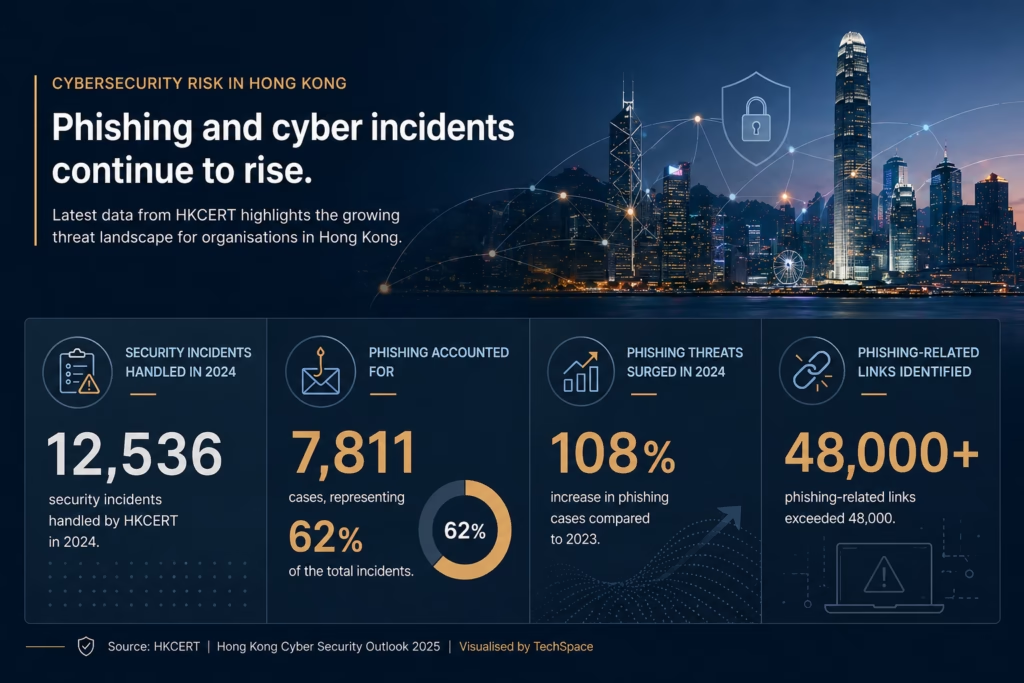
This is particularly important in Hong Kong, where phishing and cyber incidents have become a visible business risk. HKCERT reported that it handled 12,536 security incidents in 2024, with phishing accounting for 7,811 cases, or 62% of the total. HKCERT also noted that phishing cases increased by 108% from 2023, while phishing-related links exceeded 48,000.
These figures matter because many office IT vulnerabilities are not highly sophisticated. They often come from basic gaps: weak passwords, shared admin access, poorly configured user permissions, no multi-factor authentication, outdated devices, unmanaged laptops, or staff who have not been briefed on phishing risks.
Verizon’s 2024 Data Breach Investigations Report also found that more than two-thirds of breaches involved a non-malicious human element. The same report analysed 30,458 security incidents and 10,626 confirmed data breaches, giving businesses a useful reminder that security failure is often tied to ordinary behaviour, not only advanced technical attacks.
Before go live, companies should review:
- Multi-factor authentication for key systems
- Endpoint protection on all company devices
- Firewall and VPN settings
- Admin account control
- User access by role
- Guest WiFi isolation
- Password policy
- Device encryption
- Basic phishing awareness
- Offboarding process for future staff departures
Good cybersecurity is not about making office systems difficult to use. It is about reducing unnecessary exposure from the beginning.
5. Backup and Recovery Readiness
Many companies assume they have a backup system because their files are stored in the cloud. That assumption can be dangerous.
Cloud storage improves accessibility, but it does not automatically solve every backup and recovery issue. Files can still be deleted, overwritten, misconfigured, encrypted by ransomware, or lost through account compromise. The more important question is whether the business can restore what it needs, within an acceptable time frame, when something goes wrong.
Before office launch, the backup setup should be tested rather than simply enabled. This includes confirming what is backed up, how often backups run, where backup data is stored, who can access it, and how quickly key files or systems can be restored.
A backup that has never been tested is not yet a recovery plan. It is only a promise.
This matters because data incidents are expensive, even before counting reputational damage. IBM’s 2025 Cost of a Data Breach Report found that the global average cost of a data breach was US$4.4 million. While the figure reflects a global average across larger organisations and different industries, it still illustrates the scale of financial exposure when data protection and recovery are not properly managed.
For SMEs, the direct cost may be smaller, but the operational impact can still be severe: lost working hours, delayed client service, emergency IT support fees, compliance concerns, and damaged trust.
6. Communication Tools and Meeting Room Systems
Modern office IT is not limited to desks and laptops. Meeting rooms are now part of the core technology environment.
Before go live, each meeting room should be tested for video conferencing, screen sharing, audio quality, camera angle, display connection, network stability, and ease of use. The test should be done in a realistic scenario, preferably with someone joining remotely.
For hybrid teams, clients, and overseas partners, poor meeting room setup can quickly affect professionalism. A delayed call, unstable audio, or repeated connection failure may seem minor internally, but it changes how the company is experienced externally.
The same applies to phones, VoIP systems, shared calendars, room booking tools, internal chat platforms, and email groups. These tools should be ready before the office opens, not configured during the first week.
7. Pre-Go-Live Testing
The most important part of the checklist is testing the office as a working environment. This should include simultaneous usage. Ask several users to connect to WiFi, join video calls, access shared files, print documents, log into cloud systems, and move between different office areas. Test common workflows, not only individual devices.
Useful tests include:
- Multiple users logging in at the same time
- Video calls from different rooms
- File upload and download
- Printer access
- Shared drive permissions
- Guest WiFi connection
- VPN or remote access
- Backup restore test
- Power interruption scenario for key equipment
- Support escalation process
Many go-live issues are not installation failures. They are testing failures. The system may technically work, but no one has checked whether it works under pressure.
8. Documentation and Handover
Once everything is installed and tested, documentation should be completed before the project is handed over.
At minimum, the business should have a clear record of:
- Network diagram
- ISP details
- Router and firewall information
- Admin account ownership
- Software licences
- Device inventory
- Backup settings
- Vendor contacts
- Support process
- Warranty details
- Security policy basics
This is not paperwork for its own sake. Documentation protects the business from dependency risk. If only one technician understands the setup, the company becomes vulnerable when that person is unavailable. Good documentation makes future support faster, safer, and less expensive.
Final Checklist Before the First Working Day
Before the office goes live, business owners and office managers should be able to answer a few practical questions:
- Is the internet stable across all working areas?
- Has WiFi been tested under realistic usage?
- Are all user accounts ready?
- Are devices secured and updated?
- Are printers, meeting rooms, and shared systems working?
- Is multi-factor authentication enabled?
- Are backups running and tested?
- Is there a clear support contact?
- Does the company have proper IT documentation?
A smooth office launch is rarely defined by how quickly equipment is installed. It is defined by how quietly the technology disappears into daily work.
For Hong Kong companies moving into a new office or preparing for expansion, IT infrastructure should be treated as part of business readiness. The goal is not simply to connect devices. The goal is to create an office where people can start work with confidence, where systems support the business from the first day, and where avoidable disruption has already been addressed before it reaches the team.
Getting Your Office Ready for Day One
A well-prepared office IT setup is rarely noticed when everything works, but its absence is felt immediately when systems fail to support daily operations. For businesses preparing to move, expand, or upgrade their workspace, taking a structured approach before go live can prevent weeks of disruption later on.
If you are reviewing your office IT infrastructure or planning a new setup, TechSpace can help assess your readiness and ensure every system is aligned before your first working day. Contact Us Today!