When a company plans a new office in Hong Kong, the first discussions usually focus on location, rent, layout, design and furniture. Technology often comes later, after the space has already taken shape.
That sequence can create avoidable problems. Workplace technology now affects how staff connect, collaborate, secure information, welcome visitors, use meeting rooms and continue working when something goes wrong.
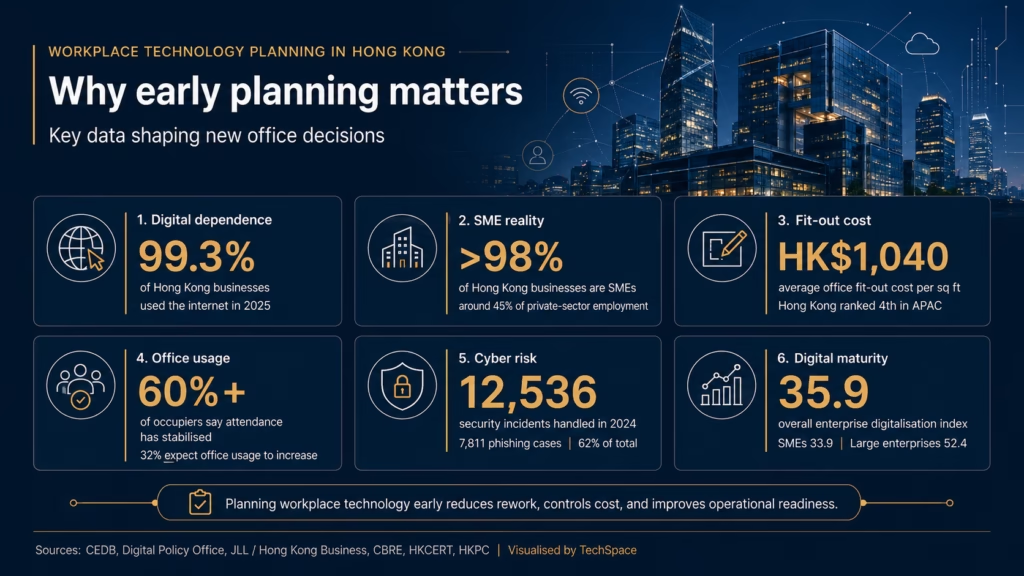
The dependency is already clear. According to the Digital Policy Office, the internet usage rate for businesses in Hong Kong reached 99.3% in 2025, while computer penetration stood at 92.5%. For most organisations, workplace technology is now part of daily operations, not a separate IT concern.
Planning it well means looking beyond devices. A new office needs a technology roadmap that connects business needs, physical space, security, budget and future growth.
Why Workplace Technology Planning Should Start Before Fit-Out
Technology decisions should begin before the office layout is finalised.
The reason is practical. WiFi access points depend on ceiling design, partitions and user density. Meeting room AV depends on room size, lighting, acoustics, screen placement and cabling routes. Security systems depend on door access points, visitor flow and user permissions. Server racks, network cabinets and comms rooms require ventilation, power, physical access control and enough space for future expansion.
If these requirements are only considered after renovation work has started, the business may face avoidable rework. A meeting room may look polished but perform poorly on video calls. A beautiful glass partition may affect WiFi coverage. A comms rack may be placed in a corner without enough cooling or cable management. The result is a workplace that looks ready but does not work smoothly.
In Hong Kong, where office fit-out is a meaningful investment, late technology planning can become costly. Hong Kong Business, citing JLL’s Global Office Fit-Out Costs Guide 2025, reported that Hong Kong ranked fourth in Asia Pacific for average office fit-out cost at around HK$1,040, or US$133, per square foot (MJPM’s article provide further information on this topic). Against that cost base, IT, AV and security decisions should be treated as part of the fit-out strategy, not as a final technical layer.
Start with Business Requirements, Not Hardware
A good workplace technology plan begins with how the company works.
Before choosing routers, screens, access control systems or collaboration tools, businesses should define their operating model. How many people will use the office on a typical day? Which teams need quiet spaces? Which teams need collaborative areas? Will staff work mainly from the office, remotely, or in a hybrid pattern? How often will clients visit? Are there compliance requirements around data, finance, legal records or customer information?
This step matters because workplace technology should reflect working habits. A sales-driven company may need reliable video conferencing, CRM access and guest WiFi. A professional services firm may place more emphasis on secure document access, private meeting rooms and controlled permissions. A fintech, trading, or finance-related business may need stronger redundancy, endpoint management and compliance-led security controls.
The office plan should also include headcount growth. A network designed only for today’s team may become strained after one hiring cycle. Cabling points, switch capacity, software licences, access control groups and support arrangements should be planned with realistic growth in mind.
Plan Network and Connectivity as Core Infrastructure
The office network is the foundation of almost every modern workplace activity.
A basic plan should cover internet bandwidth, backup connectivity, WiFi coverage, network segmentation, firewall settings and remote access. For many companies, a single internet line may feel sufficient, but the impact of downtime can be far larger than the cost of a backup line. This is especially relevant for businesses that rely on cloud software, VoIP calls, payment systems, remote access or client-facing platforms.
WiFi planning also deserves more attention than it usually receives. A simple signal test in an empty office does not represent real working conditions. The network should be designed for actual staff density, meeting room usage, mobile devices, video calls and guest access. In some offices, it may be appropriate to separate staff networks, guest networks, IoT devices and security equipment.
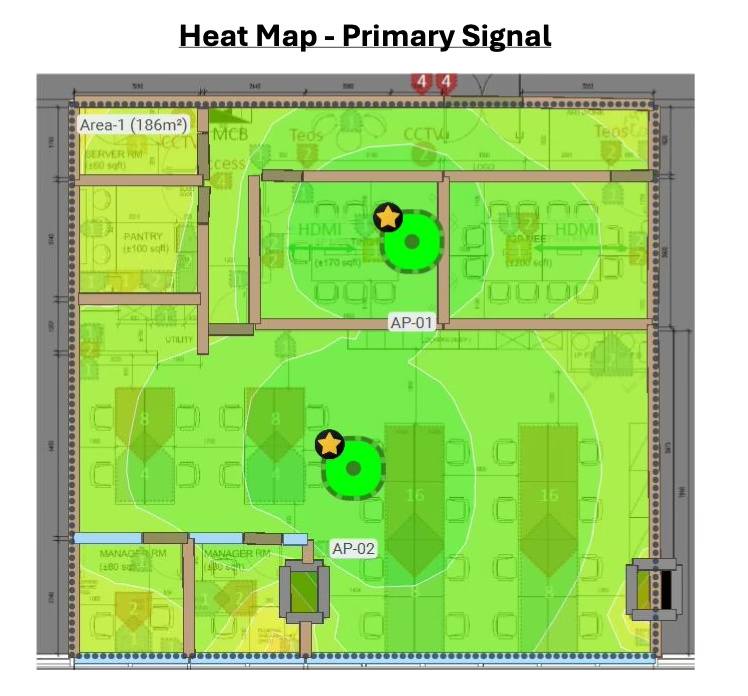
The key question is not whether the office has internet. The better question is whether the office network can support the way people will work on a busy day.
Build Collaboration Around Real Office Behaviour
The role of the office has changed.
Hybrid work has become a stable part of the regional workplace model. CBRE’s 2024 Asia Pacific Office Occupier Survey found that over 60% of occupiers said office attendance had reached a steady state, up from 50% in 2023. Another 32% expected office usage to increase over time.
This creates a different kind of technology requirement. The office is no longer only a place where people sit at desks. It is also a place for meetings, training, client discussions, team coordination and hybrid collaboration.
For a new office, this means meeting rooms should be planned as technology-enabled spaces from the beginning. Each room needs the right screen size, camera angle, microphone coverage, speaker quality, lighting, cabling and booking process. A small huddle room does not need the same setup as a boardroom. A client-facing meeting room may need a more polished AV experience than an internal discussion room.
Collaboration tools should also be standardised. If one team uses Teams, another uses Zoom, and another uses ad hoc screen sharing, meeting support becomes fragmented. A workplace technology plan should define which platforms are used, how rooms are configured, and who supports them when issues occur.
Treat Cybersecurity as a Planning Issue
Cybersecurity should not wait until after the office opens.
The risk is already visible in Hong Kong. HKCERT reported that it handled 12,536 security incidents in 2024. Phishing accounted for 7,811 cases, or 62% of all incidents, representing a 108% increase from 2023. HKCERT also noted that phishing-related links exceeded 48,000, a 150% year-on-year rise.
These figures are relevant to office planning because many security weaknesses are created during setup. Shared admin passwords, unmanaged laptops, unclear access rights, weak WiFi policies and missing multi-factor authentication can all become long-term vulnerabilities.
A new office should therefore include a security baseline before staff move in. This should cover multi-factor authentication, endpoint protection, user access levels, firewall rules, VPN access, device encryption, password policy, guest WiFi isolation and an offboarding process for future staff changes.
Access control should also be planned across both digital and physical environments. Who can enter the office? Who can enter the server or comms room? Who can access finance files, HR records, client documents or admin systems? These decisions are easier to structure at the beginning than to repair later.
Budget for Technology as a System
Technology cost is often underestimated because it is spread across different vendors and categories.
One supplier may handle cabling. Another may handle internet. Another may install AV equipment. Another may manage security systems. Software licences may sit with individual department heads. Devices may be bought separately. Support may only be arranged after problems appear.
This fragmented approach makes the true budget harder to see.
A proper workplace technology budget should include network infrastructure, cabling, WiFi access points, firewall, switches, meeting room AV, user devices, software licences, cybersecurity tools, backup systems, installation, testing, documentation and ongoing support.
There is also a maturity gap to consider. HKPC’s Hong Kong Enterprise Digitalisation Index found that the city’s overall enterprise digitalisation level stood at 35.9, categorised as “Basic”. SMEs scored 33.9, while large enterprises scored 52.4. HKPC also found that among enterprises investing in digitalisation, over 80% allocated 20% or less of their total investment to digitalising their business, and 25% cited difficulties integrating new technologies into existing businesses or systems.
For workplace planning, this points to a familiar problem: companies buy tools, but the tools are not always integrated into a clear operating system. A technology budget should therefore cover implementation quality, not only equipment cost.
Understand Landlord, Building and Site Constraints
Hong Kong office projects often involve practical constraints that are easy to miss in early planning.
Some buildings have limited internet service provider options. Some have restrictions on cabling routes, riser access, drilling, after-hours work or equipment placement. Older buildings may have power limitations or less flexible infrastructure. Grade A buildings may have clearer processes, but they may also require stricter approvals through landlords, building management offices and appointed contractors.
These constraints can affect the implementation timeline. A company may have selected the right technology solution, but if landlord approval, cabling access or ISP installation is delayed, the office may still fail to go live on schedule.
This is why site assessment should happen early. Before committing to a final layout, businesses should check internet availability, cabling routes, comms room conditions, ceiling access, meeting room requirements, power points, security points and building management procedures.
In practice, good workplace technology planning is partly technical and partly logistical.
Coordinate IT with Office Design and Fit-Out
Workplace technology works best when designers, contractors and IT specialists coordinate from the beginning.
Many office problems happen because each party works from a separate plan. Designers focus on space and aesthetics. Contractors focus on construction and timelines. IT vendors focus on systems and equipment. If these plans are not joined up, conflicts appear late.
For example, a screen may be installed at the wrong height for video calls. A meeting room table may not include suitable cable access. WiFi access points may be placed after ceiling works are complete. Door access systems may not align with visitor flow. A network cabinet may be installed without enough space for maintenance.
The solution is not complicated, but it requires early coordination. IT requirements should be reviewed together with the layout, reflected ceiling plan, power plan, furniture plan and meeting room design. This makes the office more likely to function as one system when staff arrive.
Build a Workplace Technology Roadmap
A useful roadmap does not need to be overly complex. It should give the business a clear sequence from planning to go-live.
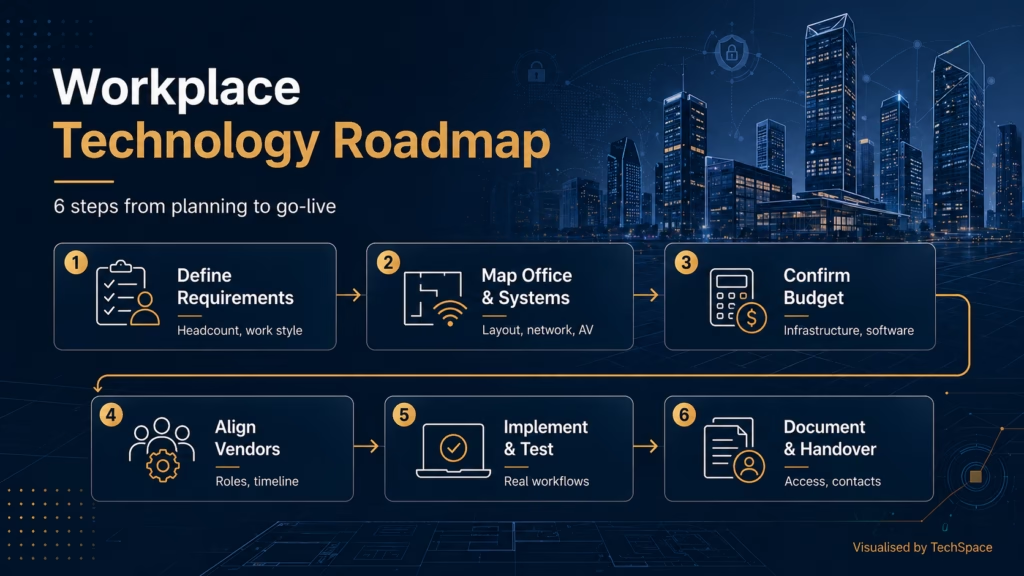
A practical roadmap may include six stages.
- First, define business requirements. This includes headcount, work style, systems, compliance needs and growth assumptions.
- Second, map technology requirements against the office layout. This includes network points, WiFi coverage, AV rooms, access control and comms areas.
- Third, confirm budget categories. The business should understand the full cost of infrastructure, devices, software, security, implementation and support.
- Fourth, align vendors and responsibilities. Each supplier should know what they own, what they depend on, and when their work must be completed.
- Fifth, plan implementation and testing. Testing should include real workflows such as video calls, file access, printing, guest WiFi, backup restore and user login.
- Sixth, prepare documentation and handover. Network diagrams, admin access, software licences, support contacts and vendor details should be recorded before the office goes live.
This roadmap gives management a clearer view of risk. It also helps prevent the common situation where the office is physically complete but operationally unready.
Final Thoughts
Workplace technology planning is often described as an IT task, but its impact reaches much further. It affects cost control, employee experience, client meetings, cybersecurity, business continuity and future scalability.
For companies preparing a new office in Hong Kong, the best time to plan technology is before decisions become difficult to change. Once walls are built, ceilings are closed and furniture is installed, every correction becomes slower and more expensive.
A well-planned office should make technology feel almost invisible. Staff can connect without friction. Meeting rooms work as expected. Security settings protect the business without disrupting daily work. Systems are documented, supported and ready for growth.
If your company is planning a new office, relocation or workplace upgrade, TechSpace can help review your technology requirements, coordinate implementation, and build a workplace technology plan that supports your business from day one.
Contact TechSpace today to plan your workplace technology with confidence and get your new office ready from day one.